


- The brand-new simulation system helps you become an expert in the sulfuric acid industry.
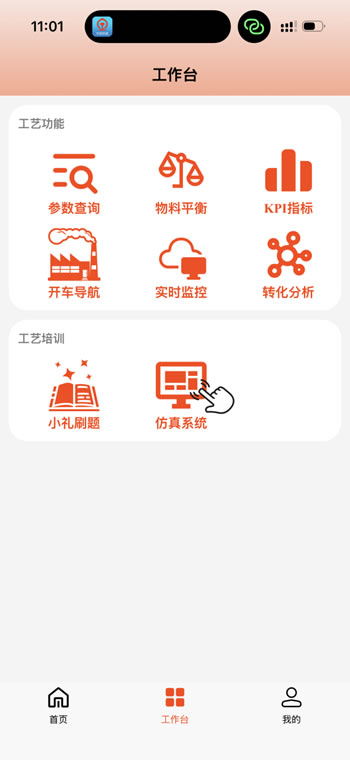
Download (digital sulfur) from the mobile application store
Preface
At the sulfuric acid production site, a minor operational error could lead to equipment shutdown, damage, or even safety incidents. For a long time, the industry has relied on the "master-mentoring-apprentice" method of experience transmission, resulting in four major problems: difficult training, high risks, difficulty in optimization, and weak emergency response capabilities. The cost of trial and error in on-site practical operations remains high, and it is an extremely long time before new employees can become industry experts.
Nowadays, Li Zhenglai has been working to establish a fair environment for technical learning in the industry. Today, our company has independently developed the OTS (Expert Training Simulation System), which is based on high-precision process models. It has created a virtual factory for the sulfuric acid plant. Here, all personnel can conduct repeated drills for various working conditions such as starting, stopping, load adjustment, and fault handling without any barriers, accumulating practical experience with zero risks.
I. Interface Overview: Highly realistic, facilitating learning
To facilitate quick learning, we have deployed the DCS interface, equipment knowledge, and electrical instrumentation knowledge to the mobile device, making the practice process more convenient. It also has an archive and review mechanism, where the system automatically saves the progress when you exit, allowing you to continue practicing at any time next time. Taking "hot start-up" as an example, the system fully replicates the core sections such as sulfur incineration conversion and drying absorption. In the sulfur incineration conversion section, you need to complete operations such as introducing steam, feeding liquid sulfur, sulfur circulation, and pre-sulfonation in sequence; in the dry absorption section, steps such as introducing circulating water and acid circulation are involved. Between the sections, automatic jumps and manual switches are supported. On the right side of the currently activated section, there will be a small white clock icon. Only the valve operations under the activated section will be judged as valid by the system. The system also has a process calculation model specially designed by process engineers to ensure that each set of process data is in line with the actual equipment. At the same time, the data between multiple process flow diagrams is synchronized in real time. When switching screens, the valve status, temperature, pressure, and other parameters will not be lost.
The system uses different colored pipelines to quickly distinguish the media. Red represents steam, blue represents air, purple represents sulfuric acid, and green represents water. Users can refer to the picture legend for identification, which facilitates quick judgment of the current process.

In addition, the system also offers two auxiliary learning functions:
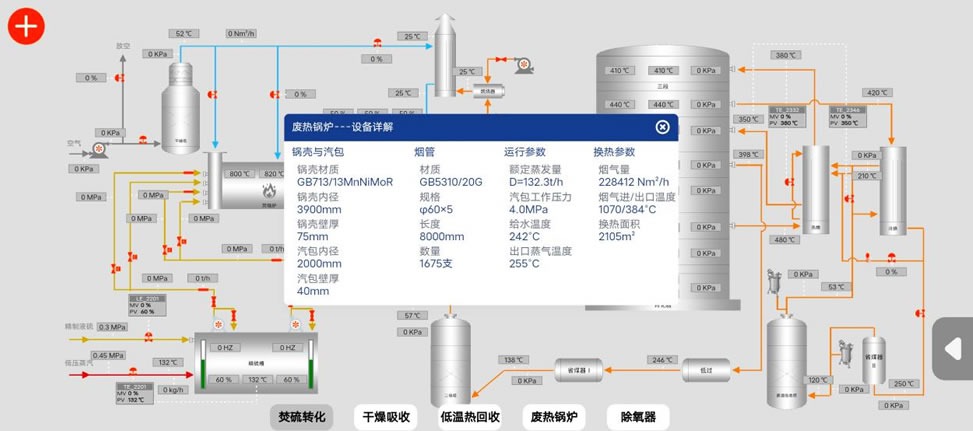
Equipment Information Card: By clicking on the icons of certain equipment (such as sulfur incinerator, drying tower, converter, etc.), you can view its design parameters (design pressure, temperature, material, etc.). These data can be customized according to the actual equipment of the customers, helping new employees build a systematic understanding while operating.
Control Indicators: The system has an internal control indicator system for key process parameters, including standard ranges for temperatures, pressures, liquid levels, and flow rates at each stage. During operation, if any parameter exceeds the safety threshold, the system will promptly give a warning.
II. Practice Mode: Zero-cost trial and error, repeatedly practice until proficient - Industry experts starting now
The practice mode is the core operational scenario of the system. Below, we will elaborate on its operation methods and interaction details.
Scene selection and save mechanism
The practice mode supports the following scenarios:
Hot-state startup
Short-term parking
After entering the page, select 【Practice Mode】→【Hot Start Driving】, and a list of saved games will pop up for selection. If there are no saved games, simply click "New Game" to enter the page.
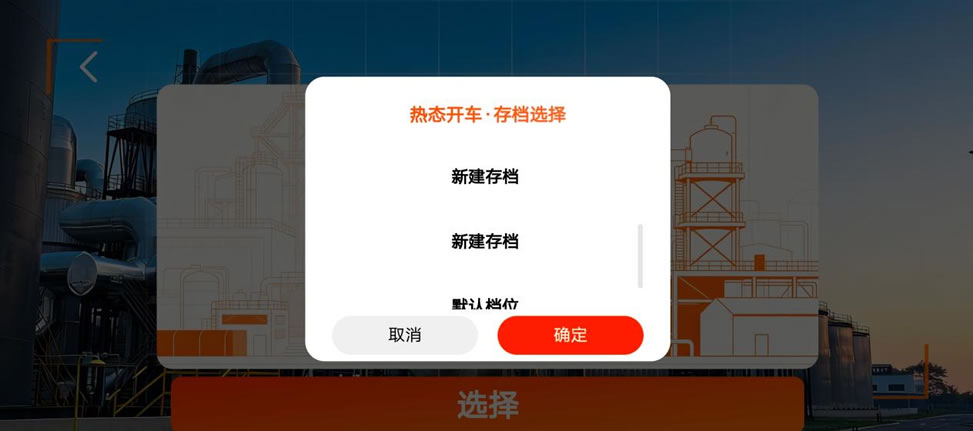
After entering the new archive, you can then proceed to the corresponding section to carry out the corresponding practice operations.
2. Right-hand operation guidance bar: There are prompts for each step.
On the right side of each flowchart, there is a fixed operation guidance bar. It will dynamically list the pending steps based on the current scenario, allowing you to know the specific driving steps and how to operate. The system will automatically mark the completed steps, enabling you to keep track of your progress at any time.
This design is particularly suitable for beginners: there's no need to memorize the operating procedures by heart; just follow the prompts to operate.
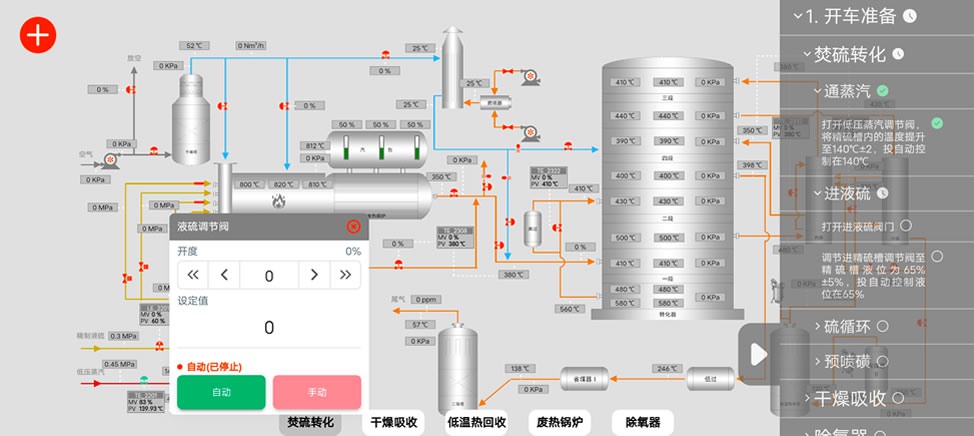
For example, the current step is "Open the inlet sulfur valve", and by clicking on the corresponding valve, an operation panel will pop up. Adjusting the opening degree can complete this step.
3. Click the operation panel: It feels like actually pressing a button.
Click on any valve or pump on the page, and an operation panel will immediately pop up. On the panel, you can:
Adjust the opening degree of the valve
Perform the switch operation
Switch control mode
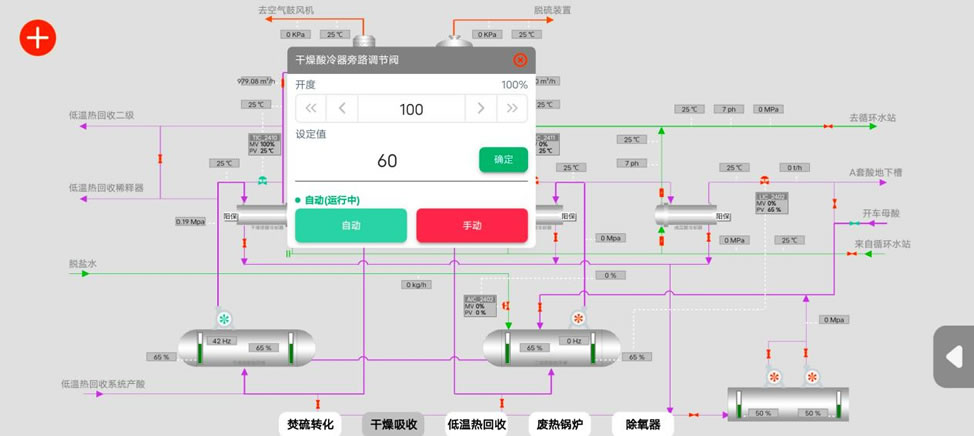
Example: Open the bypass valve of the dry acid cooler. On the screen, the color of this valve (and other valves in the same way) will change, and the corresponding temperature value will respond in real time. You can also switch to the 'automatic' mode. The system will automatically adjust the valve opening to control the acid temperature entering the tower.
4. Process Switching and Activation Rules
After completing one process section, the system will automatically switch to the next unfinished section. It is also possible to switch manually. For example, after the sulfur combustion conversion process is completed with steam supply, liquid sulfur injection, and sulfur circulation, one can manually click on "Drying and Absorption" to enter the operation; after the dry absorption process is completed, the system will automatically return to the remaining steps of the sulfur combustion conversion process to continue the operation.
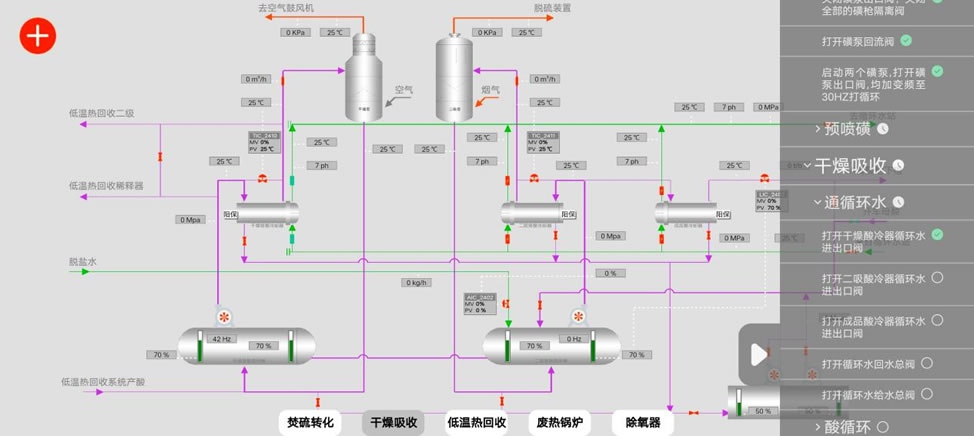
It is particularly important to note that the system only recognizes one "currently active section" at a time. A small white clock icon will be displayed next to the section. Only the steps under the activated section can be verified. For example, at this moment, the "pre-sulfonation" in the sulfurization conversion process has not been completed, but you manually switched to the drying and absorption section and are currently at the "circulating water" step. Then, the system will only verify the valve operations under the drying and absorption section, and attempting to operate the sulfurization conversion step will not be successful. Therefore, before completing any operation, please ensure that you have located the corresponding target section.
5. Valve status confirmation
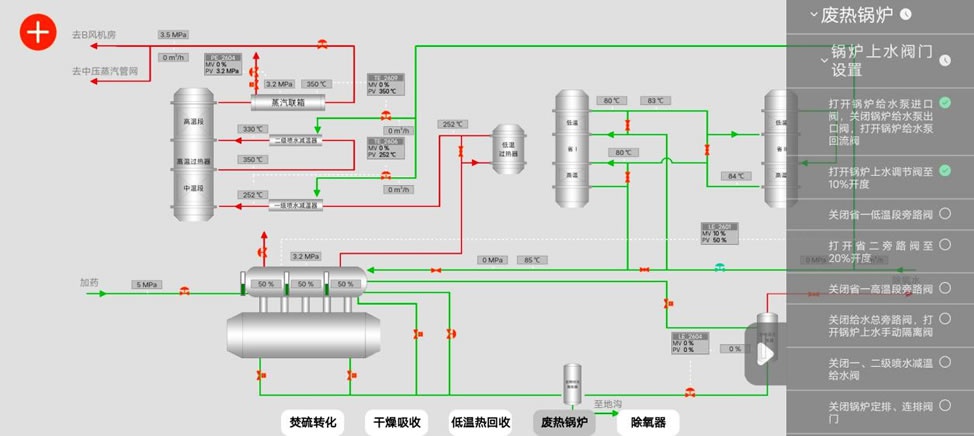
For certain operation steps that require closing valves (such as "Closing the bypass valve of the low-temperature section of the secondary unit" and "Closing the bypass valve of the high-temperature section of the secondary unit" as shown in the figure): Although the valves are already in the closed state in the current simulation, to prevent potential risks due to not actually confirming, the system requires manually clicking the valve once for inspection and confirmation. Only then can this step be verified.
6. Exceptional Alerts and Handling
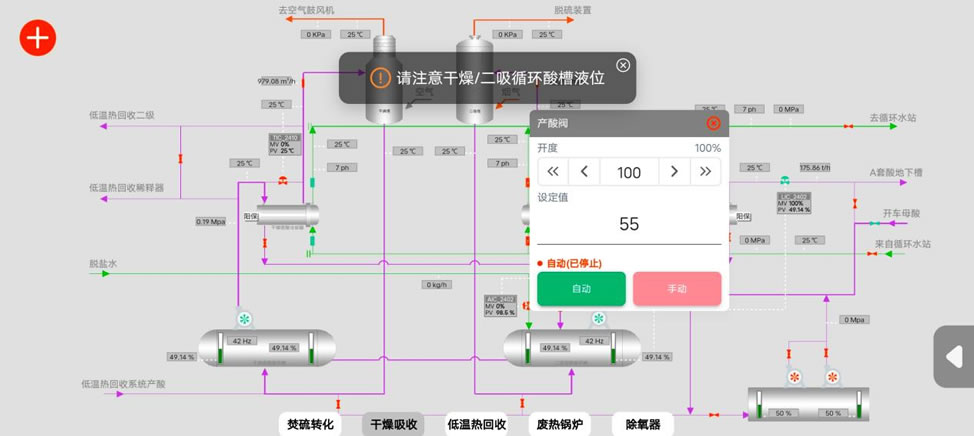
If the operation is improper, for example, if a valve is opened but not closed afterwards, resulting in abnormal situations such as a drop in liquid level or excessive temperature, the system will immediately give a prompt. At this point, one should determine the source of the problem based on the prompt and adjust the corresponding valves to solve the issue.
7. Archiving and Continuing Practice
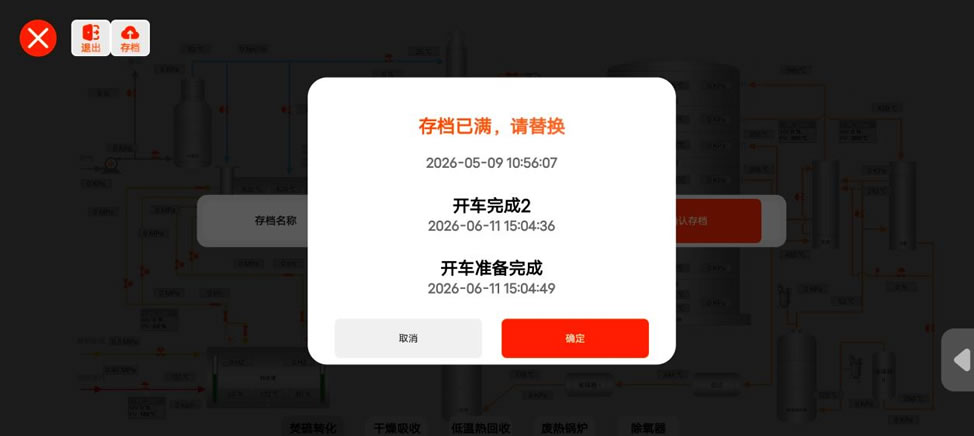
After the operation is completed, you can manually save the file. When you enter again, you can select the corresponding saved file and continue the operation from where you left off. The system supports saving up to 5 progress files. Once all 5 slots are filled, saving again will trigger a replacement option - you need to choose to overwrite one of the existing saved files. Additionally, please note: When you click "Exit", the system will automatically save the current operation status to the last saved file (i.e., the default saved file).
III. Examination Mode: Lack of Understanding, Continuous Improvement - Victory Is Just Ahead
Optional examination scenarios:
Hot-state startup
Short-term parking
After entering the page, select 【Exam Mode】→【Hot Start Driving】, click on "Start Exam", and you will enter the page to perform the exam operations.
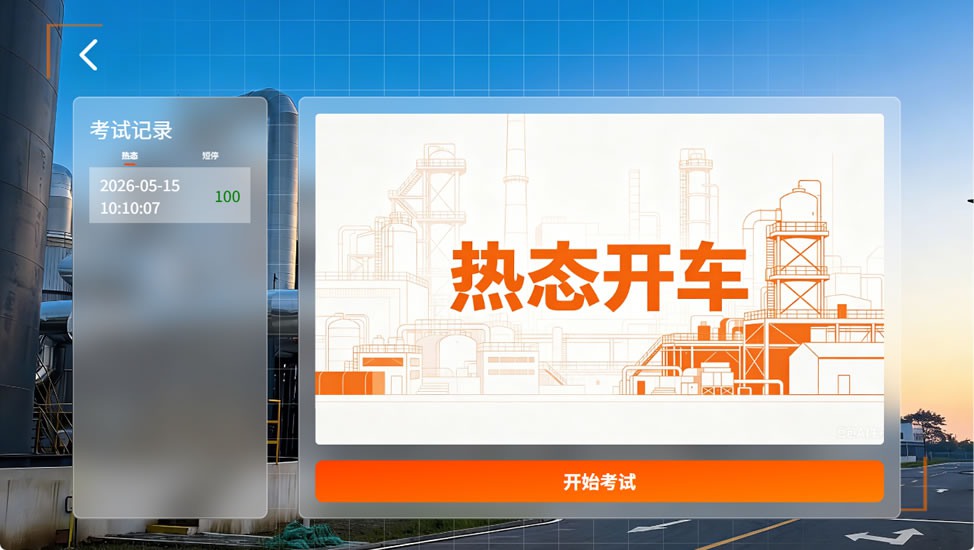
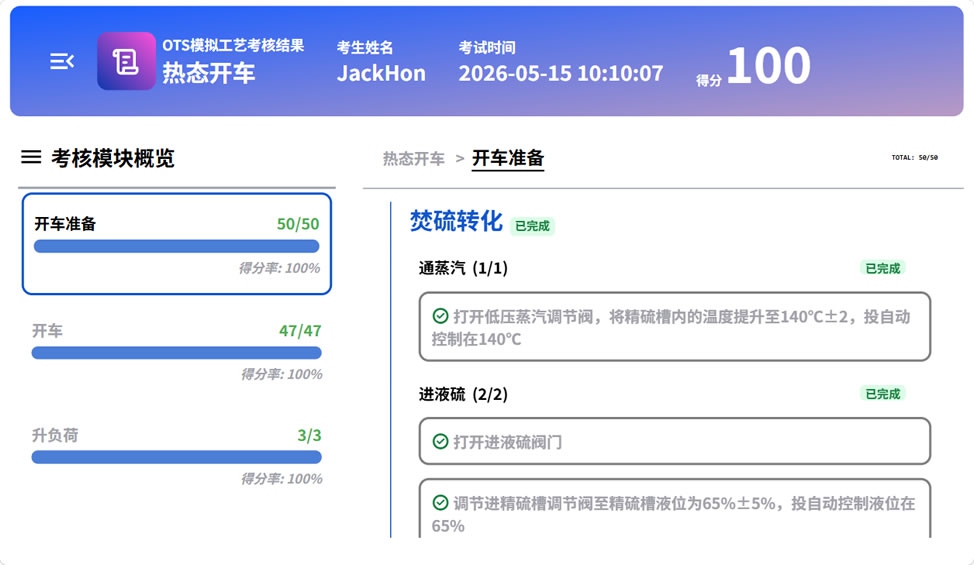
After entering the exam, the interface is the same as the practice mode, but the right operation prompt bar will be hidden. The exam duration is two hours. You can submit your answers half an hour after the exam starts. When the remaining time is only 10 minutes, the system will give a prompt. During the exam, the system will record every operation and adjustment, and automatically grade based on the preset standard operation process. The focus is on evaluating whether the parameter control is accurate and whether any operation steps are omitted. If a parameter exceeds the indicator range, points will be deducted. After submitting the answers, the system will display the detailed score results.
The above is the complete version of the Digital Sulfuric Acid Simulation System V1.0. We sincerely invite all industry colleagues to experience and try it out. If you have any suggestions for optimization or new ideas, please join the Digital Sulfuric Acid Industry Exchange Group to offer your opinions and suggestions, and help us continuously improve and perfect the system.
We will continuously enrich the content and refine the details, integrating game-based design patterns. This will enable everyone to learn through fun practical operations and solidify professional skills through immersive interactions. We are committed to creating an OTS simulation system suitable for industry practitioners, helping all of you steadily improve your technical proficiency. We also welcome you to keep following the subsequent iterations and updates of the system.